Your goal is to find the best way to move SEO forward – and have it be profitable for your company or organization.
Your options:
Outsource your SEO.
Keep your SEO in-house.
The answer isn’t the same for everyone. And your choice today might not be the same a year from now.
Here are six reasons why it makes sense to outsource SEO.
1. To remove responsibilities
Depending on the size and composition of your team, you may have a lot of marketing, technical, and/or content people wearing a lot of hats or having multiple responsibilities.
SEO requires functions that go beyond the core aspects of research, strategies, and implementation of tactics. It includes content, IT, UX and the ability to navigate any legal or compliance functions.
Outsourcing SEO often removes a responsibility (or multiple) from marketing staff, allowing them to quarterback more of the effort than to have to become an expert and go really deep in a specific channel.
2. To create accountability
Going deeper than thinking about day-to-day responsibilities is thinking about accountabilities.
When someone is wearing too many hats (including the SEO hat), it can be hard to stay focused on the work needed and be fully accountable for progress and performance.
SEO takes time. Yet, it needs a lot of tactical implementation short term to get to the benefits long term. There has to be accountability for the work.
That means the ability to equip the responsible party with the budget, resources, tools and adjacent needs (content, IT, etc.) to do the job right. Plus, there has to be an expectation of a strategy, KPIs and time for how it will happen and be measured.
A part-time resource, or one that doesn’t have all of the resources and expertise needed, can’t fairly be held accountable for the performance and quality of the effort.
3. To have moderation
I have learned over the years even on the agency side of things what it means to have someone in the middle as a moderator.
Having a third party, or someone who isn’t embedded in the organization’s day-to-day, can be a big plus.
That person or group can see things that get missed while dealing with other marketing activities, operations, sales activities or customer service.
Much like a writer proofing their own copy isn’t ideal, marketers who do their own work, with no outside perspective, can have a difficult time.
4. To create consistency
Consistency can be an issue for in-house SEO focuses. Unless part of a dedicated SEO team, there’s always likely to be a competing interest.
A customer service fire, or the need to work leads, often can take priority over SEO and elements of a plan that won’t have an immediate impact today.
Inconsistent efforts and commitments to the overall SEO strategy suffer if not done consistently and prioritized.
5. To bring in expertise
The ability to stay up-to-date and to be an expert at the level needed to craft, maintain and adapt an SEO strategy can be hard to do in-house.
Algorithms and search results are constantly changing. Competitors are everywhere. And there is a flood of information (accurate or not).
Even the most brilliant in-house SEO has to be able to stay engaged in the SEO community to stay sharp. Beyond the strategy and tactical execution, there is always a new problem to solve or something to troubleshoot.
For a complex organization or big website, it’s challenging to be a jack-of-all-trades SEO. For smaller brands and businesses, it’s hard to hire someone, let alone multiple people, only for SEO.
6. To improve ROI
It is possible to measure SEO ROI whether the effort is managed in-house or with a partner. However, it isn’t always the easiest when “hats”, accountabilities and expertise can be issues.
If you’re doing SEO, you’re investing in people, tech, content and measurement. You want to know you’re getting a return on that investment.
Are you able to tell that with an in-house team? Are there reasons or excuses why SEO isn’t going well? Do you have a moderation issue?
Really, all the reasons I noted for outsourcing point to ROI in some way. Sometimes the best option is to get a dedicated partner to take on SEO and have that be their sole focus or a primary focus to keep that effort moving forward in an accountable and ROI-measured way.
Bonus: Keeping it in house
Still not convinced that outsourcing will help you?
You’re probably right.
I have nothing against in-house teams.
In fact, I’ve worked with several brands over the years in other digital marketing channels that had a good handle on SEO and simply asked for one-off advice for things or outside audits to help provide perspective and wouldn’t have ever told them to outsource anything as they are doing outstanding work.
Some teams and organizations are set up well for an in-house team that can work closely with any and all stakeholders to move things forward.
If you have an in-house team or plan on investing in one, be sure to keep these reasons for outsourcing in mind so they don’t become obstacles or hold back the opportunity to reach your goals.
Whenever I visit LinkedIn lately, I almost always see an update from Sara Taher, the SEO Team Lead at Flywheel Digital.
And many of her posts tend to get a lot of engagement. Her updates regularly attract hundreds of reactions, comments and shares.
So what’s her secret to posting effectively on LinkedIn and being so visible? Has she figured out the LinkedIn algorithm?
Taher was kind enough to give a little insight into her LinkedIn posting strategy. What follows are highlights of our Q&A. You may notice that much of the advice Taher shares aligns with LinkedIn’s advice for creators.
Pick your LinkedIn goal(s). Taher’s biggest goal on LinkedIn? To build her personal brand.
“My audience is SEO and digital marketers mainly, but I was able to attract some tech-savvy business owners and some marketing managers looking for SEO consultants,” Taher said.
Keys to a successful LinkedIn post. Taher said she doesn’t use a schedule. She writes based on inspiration. Very often, Taher said she gets an idea for a post from something she is actively working on.
So what formula works for Taher?
“The formula is four things. Provide 1. relatable and 2. actionable information. 3. Be yourself and 4. be real.”
“SEOs can understand my posts, I make sure it’s easy and simple to understand. They also find it relevant to everyday SEO tasks.”
This post is one example of her doing that, when she discussed content audits.
Here’s another, in which she discussed optimizing the homepage:
In addition to sharing SEO insights and tips, Taher opens up about herself.
In this post, she noted how posting something about herself made her feel “seen” as a person for the first time.
And in this post, she discussed confidence, which she admitted she struggles with.
Is there a “best time” to post on LinkedIn? I know, I know. Posting at mid-morning, midweek guarantees nothing in terms of visibility or engagement for your LinkedIn post. But I was curious if Taher had noticed any days or times that worked generally for her. Here’s what she said:
“My audience is international with different time zones and even sometimes different weekend days (some countries take Friday and Saturday off as weekend). I just found that posting first thing in the morning my time, and generally posting on Sundays, Tuesdays and Wednesdays, would get the most engagement.”
What to avoid. Taher also has some advice on what doesn’t work:
“Definitely trying to be like someone else. Don’t try to imitate other people’s style,” Taher said.
Taher said she learned a lot by following other SEO experts on LinkedIn and connecting with them. But you can learn from others without copying them.
Defining success. Success will depend on your goals. So how does Tahker measure “success” for her LinkedIn post?
“Success for me is when I get engagement on a post. And when I get positive feedback from followers.”
One final bit of advice. And this is something more people in our space need to hear:
“Posting and becoming a public figure in the SEO community is a responsibility, as people actually follow your advice. So don’t post anything you are not 100% sure of.”
Instead of using the Google Tag Manager or global site tag code for cookie expiration or settings, you can now update them in GA4.
Google announced last week that if you want to make changes to the default cookie settings, you can do so right in the GA4 property column section of your account.
Read the announcement and help guide. You can read the announcement and learn how to change these settings here.
Why we care. Making these changes can now be done faster and easier through GA4 instead of contacting your developer or making updates to the global site tag.
FLEDGE is a Privacy Sandbox proposal for remarketing and audiences. It’s designed so that it can’t be used by third parties to track user browsing behavior across websites. Google will begin testing the API on AsSense accounts on August 28.
What is FLEDGE. The API uses interest groups to enable sites to display ads they believe are relevant to their users. According to Google, when a user visits a website that wants to advertise its products, an interest group owner (such as a DSP working for the site) can ask the user’s browser to add membership for the interest group. The group owner (in this example, the DSP) does this by calling the JavaScript function navigator.joinAdInterestGroup(). If the call is successful, the browser records:
The name of the interest group: for example, ‘custom-bikes’.
The owner of the interest group: for example, ‘https://ift.tt/QW0nwYm;.
Interest group configuration information to enable the browser to access bidding code, ad code, and real-time data, if the group’s owner is invited to bid in an online ad auction. This information can be updated later by the interest group owner.
Later when a user visits a website that sells ad space, the seller for the website can use FLEGDE to run an ad auction to select the most appropriate ads to display to the users. Bidding is only run for the interest groups the user is a member of, and whose owners have been invited to bid.
Learn more about FLEDGE. You can learn more about the API here.
AdSense testing. Testing for FLEDGE will begin on August 28 in AdSense. Google does not predict any revenue change or performance impacts “for now.” You can turn off access to FLEDGE on your Chrome browsers by following the instructions here.
Why we care. Google announced last week that cookies will remain in Chrome until at least mid to late 2024. However, if the FLEDGE API test is successful, audiences and remarketing ads may become less specific and advertisers could have a tougher time converting. On the other hand, as users are added to interest groups like “running shoes” for example, they could possibly be served additional ads whose products are in the same category. If you’re an advertiser, learn how the FLEDGE API could categorize your product or service and how this may impact your remarketing ads.
Google Search Console has temporarily disabled the validate fix button on its coverage report section. There is a notice that reads “Limited functionality: We are making some minor updates in the next few days. During this period you will not be able to issue new validation requests.”
What it looks like. If you try to click on any section under the coverage report, you are presented with a yellow banner that talks about the validate fix feature not working right now. Here is a screenshot from Vijay on Twitter:
What is coming? It is hard to know exactly what “minor updates” are coming in the “next few days” but be on the lookout for updates to the coverage report in Google Search Console by the end of this week.
Validate fix. So for now, the validate fix won’t work in the coverage report, but it does work under the experience reports, such as page experience, core web vitals, mobile usability, and more.
Why we care. If you are trying to validate fixes under Google Search Console’s coverage report and you cannot, you are not alone. Check back daily to see if Google enables this feature again but until then, do not worry – no one can validate fixes in the coverage report.
Whenever I mention deleting content in bulk to clients or colleagues, I’m usually met with some form of skepticism or doubt. This is usually wrapped up in several different positions, all of which make sense.
Many times, great efforts were made to produce this content, and deleting it is a blow to the emotions. Beyond the emotional hit is the financial one – content costs money, and good content costs real money. Throwing it away seems like such a waste.
And then there is skepticism around the concept – why would deleting content ever be a good idea? If Google doesn’t like it, they just won’t rank it, right? Bummer, but let’s not throw the baby out with the bathwater, right? It could rank in the future.
Let’s first dive into the idea of deleting content from a theoretical point. Then, let’s look at the scenario I was up against and why, in this case, deleting content in bulk made sense. Finally, the results from our specific use case.
Why delete content?
There are several reasons to consider deleting content in bulk on a website, but the two most pertinent are related to low-quality content and authority/relevance.
Low-quality content
Ever since Google launched the Panda update in 2011, their algorithms have been on the hunt for low-quality content. Panda has been permanently embedded into the core algorithm now, so websites no longer have to be impacted by a specific algorithm update to see the effects of low-quality content.
Google evaluates low-quality content on a page-by-page basis but does aggregate all of the indexed pages when they evaluate a website for quality. In other words, the quality of individual articles can affect how your entire site ranks.
“[Panda] measures the quality of a site pretty much by looking at the vast majority of the pages at least. But essentially allows us to take [the] quality of the whole site into account when ranking pages from that particular site and adjust the ranking accordingly for the pages.”
Google’s John Mueller has also discussed this concept multiple times, saying low-quality content on one part of your website can affect your entire website’s rankings.
Deleting the content that Google determines as “low quality” isn’t a silver bullet. However, as part of a larger strategy aimed at improving content quality and increasing topical authority, it can make sense.
Newer to the conversation than Panda is the concept of a website having topical authority. This is closely related, and oftentimes similar, to the idea that Google’s algorithms need to see your content as relevant to what your website is an authority on.
Mueller commented on this in a 2021 Office Hours, saying:
“For search engines, you are building out your reputation of knowledge on that topic. If Google can recognize that a site is good for the broader topic, then it can surface that site for broader queries on the topic as well.”
There are many ways to build topical authority, for example:
Adding backlinks from other websites that are authorities on the topic.
Controlling relevance through internal links and anchor text.
A favorite approach to gaining topical authority is publishing a lot of highly relevant, in-depth content on the topic. With a good base of helpful content on a topic, Google is much more likely to trust you for that topic by giving you higher rankings.
However, for the same reasons that this approach works when done right, it can also hurt the website when done wrong.
Publishing content about a lot of topics, without building out topical authority on each of those topics, can dilute your website’s overall authority.
There are several ways to fix topics that are not well built out. In a perfect world, you’d prefer to fully build out that topic with lots of rich, in-depth content. However, this takes time and a healthy budget.
Deleting content is often a simpler and quicker approach.
Let’s dive into one specific situation.
Backstory
The website we were working on primarily focused on one product line in the fashion niche. Since its inception in 2018, the brand built content around this product. The website ranked well for a variety of terms around this product.
In mid-2019, the brand started to expand into two more related product lines. At a glance, these three products seemed to make sense as they all fell under one umbrella.
Throughout the first part of 2020, the website started to gain some traction in rankings and organic traffic for these two new product lines. However, June 2020 was where that traction peaked.
For the second half of 2020, traffic and rankings started to decline across all parts of the website. By early 2021, traffic was down 40% from its previous June 2020 high.
Evaluation
It was tricky to evaluate much of anything in 2020, given that most of the world was shut down due to COVID-19 at the beginning, and then ended in a flurry of pent-up spending. Everything from buying patterns to seasonal trends to traffic changes had to be taken with a large grain of salt.
The drops for this website weren’t sudden, like something you might see from an algorithm update. The traffic decline was steady but never dramatic or extreme.
However, when you isolated the URLs from the three different product lines, it became pretty clear:
The oldest product and related content were performing worse than in previous years, but not dramatically worse. However, newer content that was published in this product silo was significantly slower to rank.
The two newest products and related content had lost the vast majority of their rankings and traffic.
Grouping “content silos” when analyzing poor performance is a great way to determine where problems might be.
In addition, when isolating traffic and keyword rankings from different silos, it’s important to distinguish if the losses are happening to one or two pages, or to the vast majority of the pages in the silo.
It’s common for a large share of traffic on a website to come from only a handful of pages. And, if one or two of those pages lose several key rankings, overall site traffic can drop considerably. But it isn’t as though all pages experienced a traffic drop.
On the contrary, when the majority of pages in a silo lose traffic and keyword rankings, it is a much bigger reflection on the entire silo.
Here is an example. We isolated the newer product lines, which revealed massive drops across the board.
Comparing keyword rankings for newer product lines, June 2020 to February 2021, using Ahrefs Organic Traffic report.
When looking at the same report for the original product and related content, traffic was a lot more stable. There was no growth, but there weren’t the large drops that we saw with the other product silos.
Comparing keyword rankings for the original product and related content, June 2020 to February 2021, using Ahrefs Organic Traffic report.
Organic traffic charts in Google Analytics told a similar story.
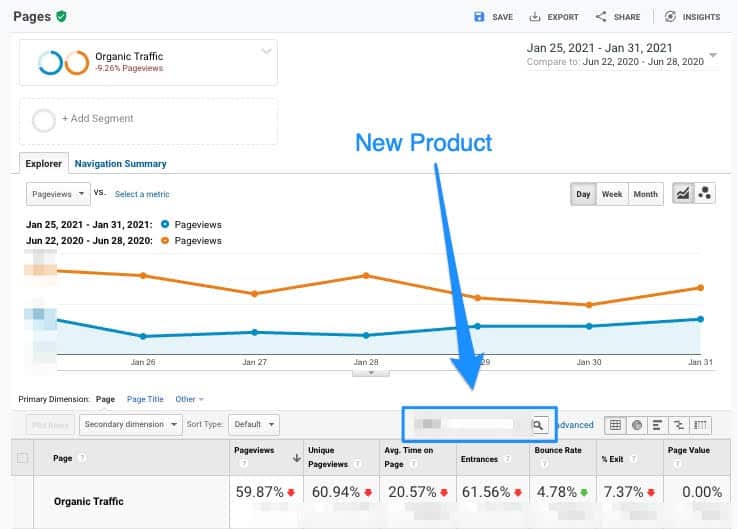
Here is one of the product terms, comparing organic traffic from the last week of January to the last week of the previous June, in Google Analytics.
In summary, we were up against several challenges:
Keyword rankings, traffic, and sales for the two new product lines had dropped considerably.
Keyword rankings, traffic, and sales for the original product line were not growing, even with new content and links going live.
What to do
Taking a step back, it seemed clear that this could be an authority and relevance problem in Google’s eyes. For several years, this site only published content around one core topic.
And while the new product lines seemed closely related, that doesn’t mean that Google transferred that topical authority over to this new content.
In other words, expanding into new products/topics might have diluted the authority the site had in its original product.
Sure, these new product silos ranked well out of the gate, perhaps relying on the site’s overall authority for these early rankings.
But, Google will sometimes change its mind on what your site is and isn’t an authority on, as we discussed above.
This can make sense, especially upon a deeper evaluation:
Most of the backlinks to the site were pointing to the first product silo.
Most of the consistent traffic was going to the first product silo.
Plan of action
There are several viable strategies to consider in such a situation as this:
Invest heavily into the silos that are losing, by producing lots of great content, updating old content and building niche-relevant backlinks.
Delete the content in the silos that are losing.
Do nothing and hope Google changes its mind about the silos
Scenario #1 is expensive, time-consuming and there is no guarantee it will work.
Scenario #2 is disappointing and removes the opportunity to rank for this content in the future. There is also no guarantee it will work.
Scenario #3 makes sense if you can make the case that the content should be ranking. In other words, you are 100% sure it is the best content on the topic. But, if you can’t make that case, then this route doesn’t make much sense.
It’s really tough to evaluate if your content is truly deserving of being the #1 result. I will say that we all generally tend to overestimate how good our own content is.
For this specific scenario, here is where we landed:
We didn’t think the content in the poorly performing silos was bad, but it wasn’t the best content available.
There probably wasn’t enough of it to fully establish topical authority, as a look at competitors showed they had a lot more content than we did.
Additionally, the appetite just wasn’t there for a heavy investment in product silos that hadn’t even been proven yet.
In scenario #2, the idea is that you delete the content silos that Google doesn’t deem you an authority on, thus raising the overall authority of the site.
You also rebalance the relevance of the site.
This is what we set out to do.
Action
Once we decided to delete all of the content from the poorly performing silos, there was some work to be done.
We isolated all of the URLs to be deleted and then evaluated each URL to see if it had backlinks or not.
We set up 301 redirects from all of the URLs that had backlinks in order to preserve the authority coming from those backlinks. We pointed these 301s to the most relevant pages for each URL. In the end, 26% of the URLs were 301 redirected.
We opted to let a lot of the pages go “dead” without redirects because we wanted Google to know that we no longer had content on this topic. The 410 code gave this information to Google even faster than the 404 code would.
We followed this up by running a site crawl and fixing any internal links that were still pointing to 301 or 410 pages.
All of this was performed during the final two weeks of February 2021.
Results
Once we had all of the pages deleted and necessary redirects set up, we knew it was a waiting game.
Depending on how frequently Google crawls your site, it can take a while for them to get through all of the deleted pages and re-index the pages on your site that are still live.
And, in terms of seeing significant change as a result of all of the deleted content, this can often take until the next Core Algorithm Update, or even further.
Gabe, among others, has talked about how recovery from Core Updates often won’t happen until subsequent updates “because there are site-level quality algorithms that refresh during broad core updates.”
While we weren’t trying to recover from a Core Update in this situation, this is what I typically expect when looking for gains from deleting content in bulk.
However, we didn’t want to just sit on our hands. Another tool we had at our disposal was to publish additional content about the topic we were now 100% focused on.
Over the next five months, we published 30 articles, ranging from informational topics to specific product reviews.
Throughout Q2 of 2021, rankings and traffic continued to erode slowly.
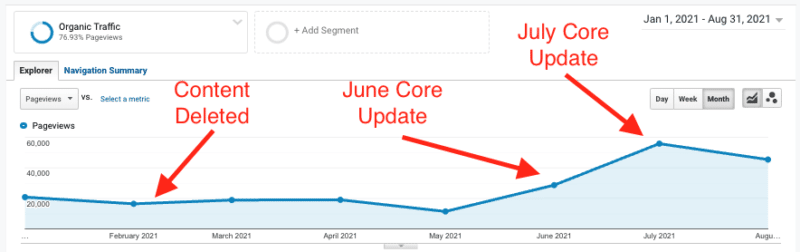
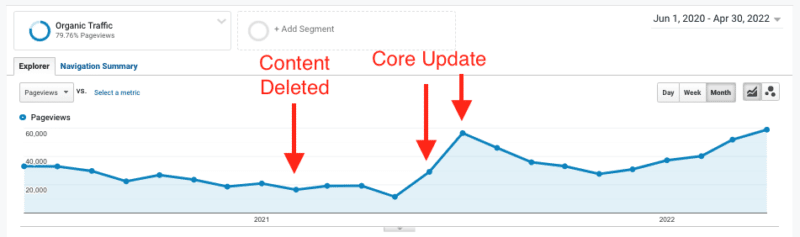
From the low point in May, traffic spiked 4.5x as a result of the June/July Core Updates. Revenue jumped 3x from its previous low.
The results really invigorated us, but we noticed that rankings and traffic started to slowly erode as we hit August and September 2021. It was slow and subtle, but we were attuned to this now.
As a result, we started publishing additional content throughout Q4 2021 by publishing a total of 56 articles. We started seeing gains in December 2021. Given that this is a website in the fashion niche, you could argue that Q4 has increased demand. But, we saw the traffic gains were matched by ranking increases.
We started a third content push in March 2022, aiming to publish 15-20 articles per month.
Traffic has now eclipsed its monthly high from July 2021, and May 2022 is on track to have its highest month of traffic ever.
Revenue is also up, with April 2022 revenue 97% higher than April 2021. Summer and Q4 are the biggest sales seasons, so hopes are high that revenue will continue to climb and exceed previous highs.
Conclusions
It is almost always better to improve the content rather than delete it. If you can do that, that should be your go-to. However, as we know, this isn’t always possible, for a variety of reasons.
Deleting content is not a silver bullet, and it doesn’t work every time. Spend the time analyzing the details of the website’s specific situation to determine if the use case lines up with when deleting content makes sense.
We deleted a lot of content along with publishing lots of new, topically focused content. If you’re looking for a true A/B test about deleting content only, this is not it. But the results are compelling nonetheless.
Pay attention to topical authority, even if you aren’t suffering from traffic drops. Google is constantly tweaking the way its algorithm evaluates authority and relevance, and you don’t want to fall on the wrong side of a Core Update.
For some niches, building topical authority is relatively simple. Publishing high-quality content that answers the query can be enough.
However, in other niches, building topical authority involves a lot more than just publishing high-quality content. Sourcing experts to contribute to long-form content pieces might be necessary. Building high-quality, niche-relevant backlinks and brand mentions might be needed. And, in these cases, a healthy amount of time and patience might be needed.
Either way, focus your efforts on establishing true topical authority. And when you fall short, consider deleting content in bulk as an option.
You’ve optimised your homepage, products and articles – but still aren’t hitting your SEO KPIs.
Why could this be happening?
Chances are your site taxonomy is holding you back.
What is site taxonomy?
Every website has a structure that acts as the scaffolding supporting your individual content pages. It’s a question of quality.
Is the system rigorous and streamlined? Or is it an unmanaged and disorganised jumble of pages?
Site taxonomy is the way in which a website classifies its content.
This allows the content to be organized into groups that share similar characteristics. This helps audiences to find content and Googlebot to index it.
The three most common site taxonomies are:
Categories: These tend to be hierarchical and general in nature.
Tags: These tend to be single value, non-hierarchical and specific in nature.
Facets (a.k.a., filters or attributes): These tend to be multi-value, non-hierarchical and specific in nature.
When you create a new category, tag or facet, you’re creating a term within your taxonomy.
More often than not, every new term auto-generates a new page based on the URL structure. And this is exactly where the SEO problems begin.
Focus on topics, not keywords
Remember the SEO dark ages of keyword targeting – where the reigning advice was to create a page for each variant; the singular, the plural, the words in a different order, etc.
Those days are behind us. Replaced by the topic focus renaissance where we as SEOs need to think bigger than keyword variations and concentrate on satisfying the user intent behind the query.
Yet many website taxonomies unknowingly hark back to those dark ages of one keyword per page. Sometimes due to a lack of understanding. Sometimes because the content is just that old. Often because of poorly maintained taxonomies.
The reality is people love to publish new content, but they are fearful to remove pages.
This leads to a teeming mass of out-of-date, badly organized, potentially cannibalistic content obfuscated by navigation that is designed for the now.
And this is a gargantuan problem for SEO.
URLs are not ranked solely on their own merits. Every page indexed by search engines impacts how the quality algorithms evaluate domain reputation.
“Our quality algorithms do look at the website overall, so they do look at everything that’s indexed. And if we see that the bulk of the indexed content is actually lower quality content then we might say ‘well, maybe this site overall is kind of lower quality’.”
All those taxonomy pages lurking in the depths of your site are causing index bloat, where an excessive number of low-value pages have made it into the index and are dragging down your ability to rank all pages on your website.
How to optimize site taxonomies
SEO category pages
If you call yourself a technical SEO, chances are you’ve invested endless hours into category tree (re)design.
You’ve delved into keyword research, competitor analysis, current user behaviour (navigation patterns, page entries, time on page, conversion rates, search behaviour, etc.), brand positioning and content coverage to see if you can not only match but satisfy the user’s intent.
This is followed by seemingly endless discussions and workshops with stakeholders to get buy-in and, after a lot of compromises, an agreement.
Then, finally, it’s time for a nerve-wracking launch that hopefully leads to an upward trend of organic search sessions.
But site taxonomy is beyond category tree design alone.
On an enterprise-level website, you may have say 50 to 300 categories and subcategories, but tens of thousands of pages auto-generated by other taxonomies, such as tags or facet combinations.
So when Googlebot comes along to look at your website, categories are only a small part of the whole.
And optimizing only a fraction of your website, even if they are the pages with the highest search volume, is not enough. Index bloat can impact your site authority.
What’s more, there’s a high chance for some of your curated category pages there lurks an unseen tag page competing for the same topic. For example, if a restaurant site may have both a category and tag page for “pizza.”
This negatively impacts user experience as it makes it more difficult to find the content the user is looking for. It also dilutes the site’s topical authority, and thus its ability to rank either of the pages.
SEO tag pages
Get a database export of every tag on your website.
You will likely be shocked by not only the number, but also the terms used.
Excessive tagging is criminal. The worst offenders are on sites where content creators can assign free-form tags to each post.
These tags are designed to speak to the entities in the story – things like a person, an event, a location or a broader topic.
I have seen multitudes of tags with only one article assigned. Not because the topic hadn’t been covered many times, but because the people manually tagging the pages don’t all think in the same words. So you get all kinds of keyword variation tag pages.
For example, for one topic (e.g., RuPaul’s Drag Race), there can be multiple free-form tags:
RuPaul Drag Race
RPDR
Ru-Pauls Drag Race
UKDragRace
Ru-Paul
All Stars
Each creating an indexable tag page (hi, BuzzFeed):
And this was just one topic.
More often than not, sites have no agreed upon limitations. No naming conventions. No method. Only madness.
By creating so many redundant tag pages, link equity value is split across multiple pages and the site is bloated with similar but thin content pages, which sends mixed signals to Google.
Quick fix: Use autocomplete to suggest existing tags as content creators begin to type.
Long-term SEO solution: Review the entire tag list. Keep tags that are valuable to users. 301 redirect or remove with a 410 those which aren’t. Then implement relevant limitations on tag creation, either via business processes or a technological approach.
SEO faceted navigation
Enterprise-level ecommerce or classifieds sites are some of the worst offenders when it comes to bloated faceted navigation.
For many sites, similar to tag pages, historical free-form entry has been the issue. So you end up with a color filter with blue, petrol and turquoise.
This creates thin content issues for the more uncommon colors – and annoys the user because there are only three items in petrol, one is actually dark blue and the other turquoise.
For other sites, the issue is balancing the needs of the user to filter down to exactly what they are looking for against indexable pages being high quality and unique. For example, you can filter down by every neighborhood in a city, but only three have substantial content.
Many sites handle their faceted navigation with dynamic parameters and falsely believe this action alone takes care of all things SEO. However, depending how it is implemented, it can have a wide range of impacts on your SEO.
What’s more, a wild proliferation of facets will inevitably lead to pages that have too little content to justify their existence. They are not useful to the user and won’t send a strong topical authority signal to search engines.
Quick fix: Consolidate facet values that will never offer either users or Google value, adding a 301 redirect if the facet was indexed.
Long-term SEO solution: Review all existing and prospective facets (keys and their values) with both SEO potential and audience usage metrics in mind. Based on this list, take data-backed decisions which are to be static vs. dynamic URLs, as well as how you will handle the parameters. Finally, decide who in your organization owns the ongoing maintenance of that list.
Taxonomy creation is not a one-time event
The secret to designing website taxonomy?
It will never be finished and it will never be perfect because content is constantly in flux:
Categories become obsolete.
New types of products are added.
Market conditions change.
Brand positioning shifts.
Fresh user data highlights previously unseen opportunities.
There needs to be a plan on how to optimize site taxonomy on a regular basis.
This often involves a controlled vocabulary – an authoritative, restricted list of terms to classify content to support findability.
And this requires taxonomy governance – a design for existing and future content to follow the taxonomy with clear directives of when terms are to be added, edited or removed and by whom to reflect the changing needs of users.
The problem? The best laid plans rarely work in the long term.
People leave. Decision power shifts. All that documentation will likely be forgotten.
Site taxonomy tool
Rather than having site taxonomy as something to be reviewed on a periodic basis, get familiar with APIs (or hire a developer who is) and build yourself a site taxonomy tool that gives you all the data you need to make the right taxonomy decisions on an ongoing basis.
Understand the reality of your current taxonomies by adding terms and mapping them against a taxonomy type, URL and associated keywords.
Then, for each term, you can begin to balance topic demand against content supply.
Understand on-site demand with pageviews and site search data from the Google Analytics Reporting API and off-site demand by connecting to the Google Search Console API to pull impressions, CTR and position. For wider market demand, you can pull data from the Google Ads API or the unofficial Google Trends API.
Understand the amount and quality of supply from your database by pulling in the number of content pieces that are assigned to that taxonomy term, freshness based on the average age of the most recent content pieces or bounce rates from the Google Analytics Reporting API.
Bear in mind, the best site taxonomy ever designed won’t perform well if it’s not properly applied so that the right content gets the right tags.
Why use a living tool, rather than periodic review and formal documentation?
You can scale the site taxonomy in response primarily to the website’s end user, secondarily to the market.
Based decisions on data over individual opinions.
Drive a deeper understanding of topics and intents to help you provide content users actually want, not content based only on the face-value of keywords.


 (@VijayChauhanSEO)